> For the complete documentation index, see [llms.txt](https://docs.material.security/llms.txt). Markdown versions of documentation pages are available by appending `.md` to page URLs; this page is available as [Markdown](https://docs.material.security/whats-new/previous-releases/version-1.62.md).

# Version 1.62

Version 1.62 gives your team sharper visibility and faster control across File Security, OAuth investigations, and email threats. See how file issues are resolved, focus OAuth reviews on the accounts with the most at stake, and manage Trusted Entities with less effort.

This release also extends calendar remediation to delegated Google calendars and expands built-in email threat coverage.

***

## :tada: New

### See how your file issues get resolved

The [File Security report](https://docs.material.security/getting-started/deployment-guides/your-first-30-days/7-enable-file-security) has a new **File issue resolution** section that shows how file issues were handled over the date range you've selected: which ones were resolved, which were ignored, and which are still open.

<figure><img src="https://3411262179-files.gitbook.io/~/files/v0/b/gitbook-x-prod.appspot.com/o/spaces%2FksjM8NywYRSHu1IlfxdP%2Fuploads%2FyQy5yX4vtQ1jlWGBbxiE%2Fimage.png?alt=media&#x26;token=a1a5ef53-31a7-4db1-9ea9-0dd3d950eaa0" alt="File Security report showing the File issue resolution section and issue status counts."><figcaption><p>File issue resolution in the File Security report</p></figcaption></figure>

The rest of the report tells you where your exposure is. This section tells you what your team did about it, so you can see whether your file issues are actually getting worked or just accumulating.

{% hint style="info" %}
File Security reports are available for customers with Advanced licenses.
{% endhint %}

***

## ✨ Enhancements

### OAuth apps and accounts

#### Risk context on an app's Accounts tab

When you open an OAuth app and view the **Accounts** tab, you can now see what each account has at stake, without leaving the app to look it up. Four new columns are available:

* **Sensitive Email Redaction**
* **Sensitive Emails**
* **Sensitive Files**
* **VIP**

<figure><img src="https://3411262179-files.gitbook.io/~/files/v0/b/gitbook-x-prod.appspot.com/o/spaces%2FksjM8NywYRSHu1IlfxdP%2Fuploads%2FxHL9lbIafoyLOj6hFn8T%2Fimage.png?alt=media&#x26;token=d5e1d6dc-257b-441d-98d3-d2b5db1130eb" alt="OAuth app Accounts tab showing risk context columns for sensitive email, sensitive files, and VIP accounts."><figcaption><p>Risk context columns on an OAuth app's Accounts tab</p></figcaption></figure>

**Sensitive Email Redaction** also works as a filter, so you can narrow the tab to the accounts that aren't covered. All four columns come through in the CSV export, so you can pull an account list with its risk context attached. **Sensitive Emails** and **Sensitive Files** count everything the account holds, rather than only what this app can reach.

The **Revoked at** column is now folded into **App status**: a revoked account shows its revoke date on the status badge itself, so the tab holds more information in less width.

{% hint style="info" %}
Learn more about [investigating malicious OAuth apps](https://docs.material.security/learn-more/risk-areas/malicious-oauth-apps/).
{% endhint %}

***

### Trusted Entity changes revalidate Drive file issues

When you add a domain to [Trusted Entities](https://docs.material.security/getting-started/fundamentals/detect/trusted-entities), remove one, or change one in a way that affects how Drive shares are judged, Material re-analyzes the Google Drive files that domain affects and updates the file issues accordingly.

Previously, trusting an organization you'd already decided was safe left the issues for its shares sitting open. Now they close on their own.

This works in both directions, so narrowing trust brings back the issues that should be open again. Two things to know:

* It applies to Trusted Entities added as a domain, and to Google Drive files
* Changing a setting that only affects email handling doesn't trigger a Drive re-analysis

<figure><img src="https://3411262179-files.gitbook.io/~/files/v0/b/gitbook-x-prod.appspot.com/o/spaces%2FksjM8NywYRSHu1IlfxdP%2Fuploads%2FoLMMiLZQy8NQnj8tnxqw%2Fimage.png?alt=media&#x26;token=592a9aa4-136d-4484-a8c5-e3a7c4dbe405" alt="Trusted Entity configuration for a domain that affects Google Drive file issue evaluation."><figcaption><p>Trusted Entity changes re-evaluate affected Drive file issues</p></figcaption></figure>

***

### Trusted entities

#### Update trusted entity settings in bulk

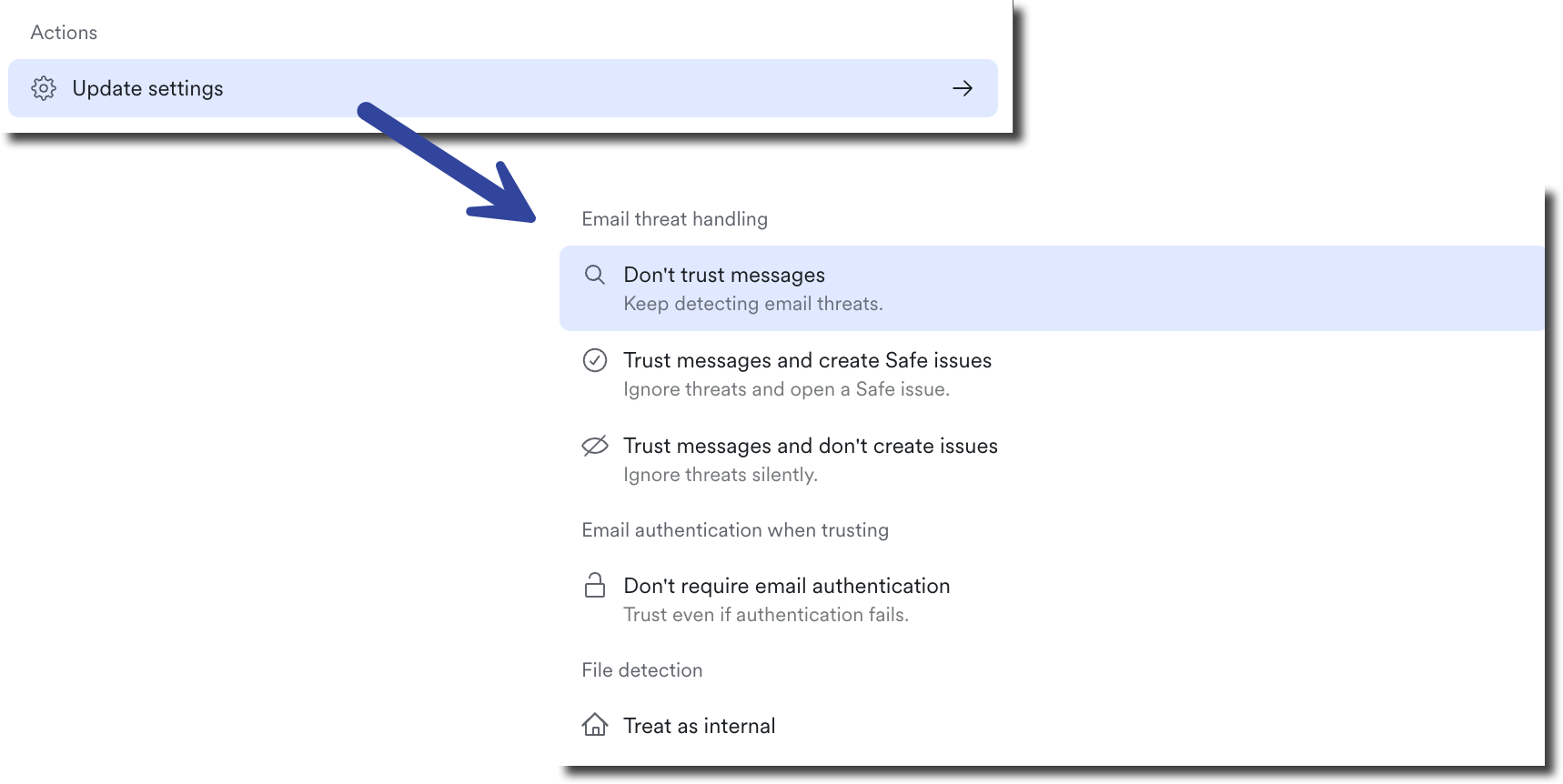
From a [Trusted Entity's](#trusted-entities) detail view, use **⌘K** to open the command menu. The menu has an **Update settings** group, so you can change how an entity is treated without walking through each setting one at a time:

<figure><img src="https://3411262179-files.gitbook.io/~/files/v0/b/gitbook-x-prod.appspot.com/o/spaces%2FksjM8NywYRSHu1IlfxdP%2Fuploads%2Fwtl2YWRppj8d6Op7NBaG%2Fimage.png?alt=media&#x26;token=455b7d52-4bd6-4ee5-8896-ac8e79aff0f6" alt="Trusted Entity command menu with the Update settings option." width="563"><figcaption><p>Update Trusted Entity settings from the command menu</p></figcaption></figure>

* **Email threat handling**: don't trust messages, trust messages and create Safe issues, or trust messages and don't create issues
* **Email authentication when trusting**: required or not required
* **File detection**: treat as internal or treat as external
* **Subdomains**: included or not included

{% hint style="warning" %}
Email threat handling comes first because it governs the rest.
{% endhint %}

#### Clearer Trusted Entity and sensitive category controls

The trusted entity details view drops the long introductory paragraphs in favor of a toggle, **Trust messages from this entity**, with the choices that depend on it nested underneath. Each option carries a one-line description of what it does, so you can tell what you're changing before you change it.

<figure><img src="https://3411262179-files.gitbook.io/~/files/v0/b/gitbook-x-prod.appspot.com/o/spaces%2FksjM8NywYRSHu1IlfxdP%2Fuploads%2Feud6KjKODM2S4BaBkyEZ%2Fimage.png?alt=media&#x26;token=99bcb26c-74c9-4b74-9307-9704e8a87d73" alt="Trusted Entity settings with the Trust messages from this entity toggle and dependent options." width="236"><figcaption><p>Trusted Entity controls with nested settings</p></figcaption></figure>

The sensitive category details page picks up the same dropdown styling for **Email Response**, **File Response**, and **Severity**, so the three controls now read as one set.

***

### File Security

#### Start a file detection response with a grace period

A file detection's remediation response can now open with a grace period, before any email notification goes out. That gives the file owner a window to fix the sharing themselves, rather than having Material act first and explain afterward.

<figure><img src="https://3411262179-files.gitbook.io/~/files/v0/b/gitbook-x-prod.appspot.com/o/spaces%2FksjM8NywYRSHu1IlfxdP%2Fuploads%2F7STk6IFUdqFPNLuzEX2q%2Fimage.png?alt=media&#x26;token=a58e26b7-17b2-425a-bc2c-436d8f4a0dc5" alt="File detection response settings showing a grace period before notification or remediation." width="287"><figcaption><p>Add a grace period to a file detection response</p></figcaption></figure>

Editing a response also works the same way everywhere now. On file detection, OAuth app, and email threat issue detail views, your edits stay pending until you save them, with one save and cancel control in the same place on each view.

***

### Email security and remediation

#### Calendar remediation reaches delegated Google calendars

When someone marks a malicious Google calendar invite for remediation, Material now removes the event from the calendar it actually targets, not just the mailbox the notification arrived in.

This matters when an assistant or delegate receives calendar notifications for someone else. Previously the invite could stay on the owner's calendar because Material only looked at the recipient's own. Now the event comes off the owner's calendar.

{% hint style="info" %}
Learn more about how Material [remediates calendar invites](https://docs.material.security/learn-more/risk-areas/email-threats/detect/material-email-threat-detections/calendar-invite-attacks).
{% endhint %}

#### A caution note on email bomb notifications

The notification an end user receives when [Email Bomb Protection](https://docs.material.security/learn-more/risk-areas/email-threats/detect/material-email-threat-detections/email-bomb-protection) holds their mail now warns them that attackers may follow the flood with a direct approach by phone, Slack, Teams, or email, posing as IT support, and tells them not to engage or share information.

An email bomb is often cover for a second move against the same person. The notification now says so at the moment they're most likely to be targeted.

***

### Detections

#### Clearer descriptions on insecure-MFA detections

The detections that fire when a sign-in completes with a factor that isn't phishing-resistant now describe what they actually caught. The previous wording read as though MFA wasn't configured at all, which sent teams looking for the wrong problem: MFA may well be on, just not in a form that resists phishing. The updated descriptions explain that distinction and point toward security keys and passkeys.

Two specific situations are now labeled plainly rather than left to interpretation:

* A challenge from a location the account has used before, which isn't an unusual-location alert
* Access with only a password and no second factor

This applies to both the Google and Microsoft insecure-factor detections, which share the same guidance.

***

### Issues and investigation

#### A quieter activity timeline

The activity timeline on Email Threat issues no longer lists message locked and unlocked entries. Those fired on every tracked message, including ones with nothing to report, and buried the events worth reading. Retrieval events still appear.

<figure><img src="https://3411262179-files.gitbook.io/~/files/v0/b/gitbook-x-prod.appspot.com/o/spaces%2FksjM8NywYRSHu1IlfxdP%2Fuploads%2FSzDHwKP3b2dRZxLL5LlB%2Fimage.png?alt=media&#x26;token=8dec8a69-7043-4651-ba27-7166040797d7" alt="Email Threat issue activity timeline with message lock and unlock events removed."><figcaption><p>Quieter activity timeline on Email Threat issues</p></figcaption></figure>

#### One detail view, however you get there

Opening an issue, detection, investigation, account, group, tenant, message, file, or category from a saved link or a notification now brings up the same view you get by clicking the row in the list. Previously those links could load an older, different-looking version of the same page.

Existing bookmarks and notification links keep working. If you copy a link from one of these views, the URL may look different than it used to.

***

### Expanded email threat detection coverage

{% hint style="success" %}
New detection coverage rolls out continuously, independent of our release cycle. The items below are what's new since the previous release.
{% endhint %}

Material expands built-in [email threat detections](https://docs.material.security/learn-more/risk-areas/email-threats/detect/) with no configuration required. New coverage includes:

* Business email compromise lures that impersonate a file-share notification, plus broader coverage of malicious links in business email compromise messages
* Business email compromise links hidden inside HTML markup
* Phishing pages hosted on developer platforms and decentralized storage networks
* Suspicious file-sharing links that don't impersonate a particular brand
* DocuSign impersonation paired with a lure, and Facebook impersonation

Material also scans more attachment types for these threats, including calendar invite files and additional image formats, so image-based invoice and callback lures are caught more often.

Existing coverage was tuned to reduce false positives on legitimate marketing and service notification mail, so fewer safe messages reach your queue.

***

## 🐛 Fixes

**Detections and File Security**

* Custom Google Drive detections that reference a trusted entity now evaluate correctly instead of failing with an error, so those detections run as written.
* Files owned by accounts on a shared instance are now scoped to the right tenant, so an admin limited to specific tenants no longer sees internal Google Drive file owners labeled as external.
* When you disable or archive a detection, Material asks what to do with the issues it already created: **Leave as-is**, **Mark as ignored**, or **Mark as resolved**. That choice is now applied reliably, working through the issues in batches and picking up where it left off, so even a large backlog finishes.

**Issues and investigation**

* The **Analysis** filter now applies on grouped issue lists, such as the Data Security page and severity-grouped views. Previously a grouped view returned every issue regardless of the value you'd selected.
* Opening a message group that contains an issue you don't have access to no longer fails. The issues you can't see are left out of the group instead.
* The **Assign to** batch action now opens the assignee picker instead of closing straight away.
* With a detail view open over a list, batch commands now apply only to the record you're looking at, rather than to everything still selected in the list behind it.
* In Explorer, choosing **Select all** and then scrolling to load more results keeps you in bulk selection mode, with the newly loaded rows included.
* User-reported email threat issues built from an internal reporting mailbox now show the reported message itself, with its own sender, subject, date, body, and attachments, rather than the wrapper the reporting tool added around it.

**OAuth apps and accounts**

* A **revoke tokens for all users** response now also covers users who grant the app after the response is in place, so a newly granted app doesn't keep access indefinitely.

**Platform and administration**

* Connecting an AI client to the [Material MCP server](https://docs.material.security/reference/material-mcp-server) over OAuth no longer loops between the consent screen and the client, or ends on an unexpected "authorization request has expired" message.
* API calls to list simulations no longer return a 403 error.
* The organization profile footer in **Settings** > **Org Profile** now saves when it contains an ampersand, so you can add links that carry query parameters.
* Settings now shows a single, accurate license tier on dedicated instances that have more than one tier active.
* Phishing simulation results no longer count clicks from automated scanners and other clients that don't render the page as participant clicks, so your campaign numbers reflect real people.
* The Material logo renders correctly in remediated attachment stubs, including in Outlook's preview, and branding is consistent across the stubs, notifications, and branded pages end users see.
* UI polish: classification and detection dropdowns in the command menu use consistent colors, and the **Created By** column on the API tokens table matches the **Actor** column on the audit log.

***

## 🗑️ Removed

### Account sent an email to a personal account

The **Account sent an email to a personal account** detection has been retired. It no longer creates issues and no longer appears in your detections list. Issues it created in the past stay intact and searchable, and any that were still open or snoozed are closed automatically.

**Account sent a sensitive email to a personal account** remains active, so you keep coverage on the mail that carries sensitive content, which is where the risk actually sits.

***

## :books: New and Updated Documentation

**New**

* [Calendar Invite Attacks](https://docs.material.security/learn-more/risk-areas/email-threats/detect/material-email-threat-detections/calendar-invite-attacks): New page on how attackers use calendar invitations, what Material removes when it remediates the message behind an invite, and the Google Workspace or Microsoft 365 setting that closes the path where an invite lands on a calendar with no message at all.

**Updated**

* [API v1](https://docs.material.security/reference): Refreshed overview of what you can do across the v1 API and the MCP tools.
  * [Hello World](https://docs.material.security/reference/api-v1/hello-world): Adds worked v1 API examples for the accounts, groups, roles, and OAuth app endpoints.
  * [Authentication](https://docs.material.security/reference/api-v1/authentication) and [Errors and Troubleshooting](https://docs.material.security/reference/api-v1/errors-and-troubleshooting): Clarify how to authenticate to the v1 API and expand the error reference.
* [Material MCP Server](https://docs.material.security/reference/material-mcp-server): Documents the tools for accounts, groups, roles, and OAuth apps, and expands the connection instructions.


---

# Agent Instructions
This documentation is published with GitBook. GitBook is the documentation platform designed so that both humans and AI agents can read, navigate, and reason over technical content effectively. Learn more at gitbook.com.

## Querying This Documentation
If you need additional information that is not directly available in this page, you can query the documentation by asking a question.

Perform an HTTP GET request on the following URL with the `ask` and `goal` query parameters:

```
GET https://docs.material.security/whats-new/previous-releases/version-1.62.md?ask=<question>&goal=<user_goal>
```

`ask` is the immediate question: it should be specific, self-contained, and written in natural language.
`goal` is what the user is ultimately trying to achieve, the reason they need the answer. Sharing it helps GitBook give you a better, more relevant answer. A goal is most helpful when it describes the outcome the user wants rather than restating the question. For example, with `ask=how do I create an API token`, a goal like `automate deployments from our CI pipeline` lets GitBook tailor the answer to that use case.

The response will contain a direct answer to the question and relevant excerpts and sources from the documentation.

Use this mechanism when the answer is not explicitly present in the current page, you need clarification or additional context, or you want to retrieve related documentation sections.