> For the complete documentation index, see [llms.txt](https://docs.material.security/llms.txt). Markdown versions of documentation pages are available by appending `.md` to page URLs; this page is available as [Markdown](https://docs.material.security/whats-new/previous-releases/1.15-to-1.43/version-1.35.md).
# Version 1.35
## 📢 Email Threats Reports (Beta)
We’re excited to announce the beta release of our revamped Email Threats reporting experience, designed to provide deeper insights, clearer visuals, and more actionable intelligence across your organization’s email security landscape.
Email Threats reports now have:
* **Overview:** A quick high-level look at key metrics, like number of overall email attacks prevented, VIP attacks prevented, and attacks since the previous time period selected
* **Attack Tactics:** Tactic counts and breakdowns used to deliver insights on email threat types faced
* **Attacker Profiles:** Summary of various attacker profiles and statistics
Improvements:
* **📊 Improved Visualization & Clarity:** Enhanced data visualizations and updated graphics to highlight important trends at a glance
* **🔍 Drill-Down Capabilities:** Data points now support drill-down interactions, so you can investigate threats, user behavior, and remediation actions with greater depth and flexibility
* **📤 Share:** You can now export reports, making it easier to share insights across teams and leadership
## 🛠 Enhancements
#### **Default Remediation Actions**
[Admins](/administration/admin-roles/permissions-matrices.md#detections) can now configure a default remediation action that is automatically staged when manually updating a classification. If you change the classification on an issue, click **Save** to trigger the new response.
To configure the response:
1. Click **Settings**
2. Expand **Email Threats**, then click **Issue Triage**.
3. Set remediation per classification just as you would with [User Report Auto Classification](/email-protections/user-reports/user-report-auto-classification.md):
***
#### Clearer Remediation Applied Indicators
Visual cues in issues now better reflect which remediations have already been applied, improving clarity during triage and review:
***
* **Audit Log Confidentiality Improvements** - Improved confidentiality of the audit log. Only [Super Admins and Tenant Admins](/administration/admin-roles.md) can view audit events generated by other users.
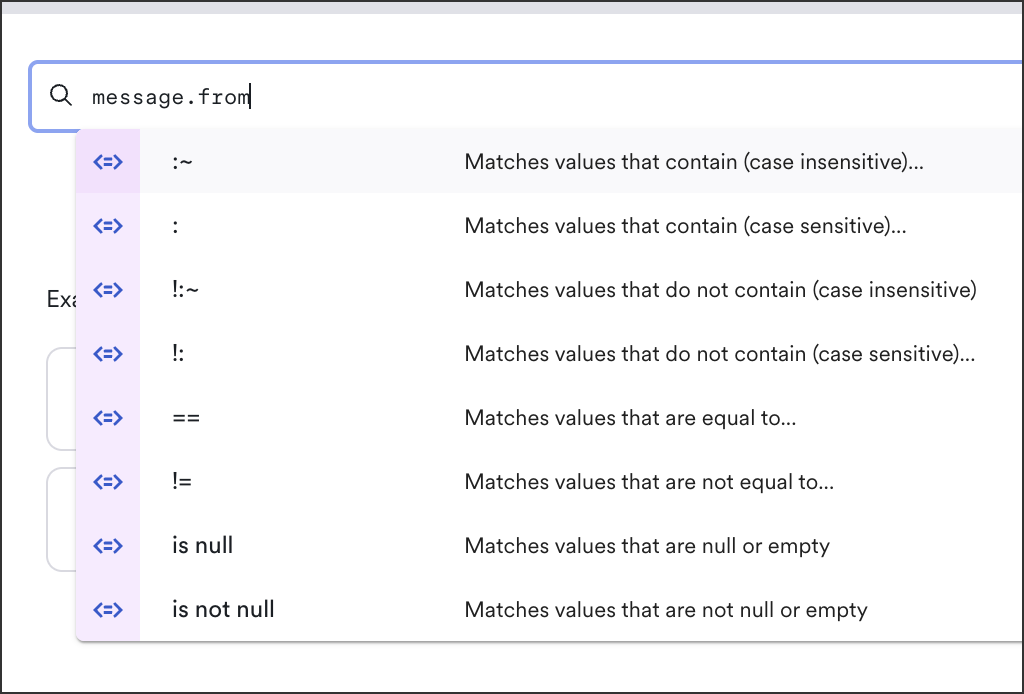
* **Smarter Message Search** - Enhanced support for `message.from` filters and improved query handling by sanitizing unsupported characters, making it easier to find exactly what you're looking for.
* **Better Reporter Acknowledgement Setup Flow** - We've refined the setup experience for reporter acknowledgements, making configuration more intuitive and reliable.
***
## 🐛 Bug Fixes
* Resolved an issue with pagination when viewing similar messages.
* Fixed an issue preventing users from navigating to specific messages from the recipients detail panel within issue details.
* Fixed a bug where images in the reporter acknowledgement email template could sometimes overflow their container.
***
## :books: New and Updated Documentation
* [New Admin Roles docs](/administration/admin-roles.md), completely updated for permissions and role descriptions
---
# Agent Instructions
This documentation is published with GitBook. GitBook is the documentation platform designed so that both humans and AI agents can read, navigate, and reason over technical content effectively. Learn more at gitbook.com.
## Querying This Documentation
If you need additional information that is not directly available in this page, you can query the documentation by asking a question.
Perform an HTTP GET request on the following URL with the `ask` and `goal` query parameters:
```
GET https://docs.material.security/whats-new/previous-releases/1.15-to-1.43/version-1.35.md?ask=&goal=
```
`ask` is the immediate question: it should be specific, self-contained, and written in natural language.
`goal` is what the user is ultimately trying to achieve, the reason they need the answer. Sharing it helps GitBook give you a better, more relevant answer. A goal is most helpful when it describes the outcome the user wants rather than restating the question. For example, with `ask=how do I create an API token`, a goal like `automate deployments from our CI pipeline` lets GitBook tailor the answer to that use case.
The response will contain a direct answer to the question and relevant excerpts and sources from the documentation.
Use this mechanism when the answer is not explicitly present in the current page, you need clarification or additional context, or you want to retrieve related documentation sections.

 2. Expand **Email Threats**, then click **Issue Triage**.
3. Set remediation per classification just as you would with [User Report Auto Classification](/email-protections/user-reports/user-report-auto-classification.md):
2. Expand **Email Threats**, then click **Issue Triage**.
3. Set remediation per classification just as you would with [User Report Auto Classification](/email-protections/user-reports/user-report-auto-classification.md):