> For the complete documentation index, see [llms.txt](https://docs.material.security/llms.txt). Markdown versions of documentation pages are available by appending `.md` to page URLs; this page is available as [Markdown](https://docs.material.security/email-protections/user-reports/user-report-auto-classification.md).
# User Report Auto Classification
User Report Auto Classification automatically investigates and classifies user-reported messages to enable you to effectively field these critical detections.
You can choose to:
* Manually classify and we'll make classification recommendations that you can accept, or
* Take it a step further and [enable auto classification](#enable-auto-classification) to automatically accept classification recommendations and apply any response or remediation you pre-configured
## How does auto-classification work?
### Classification
When a user reports a suspicious email, we first check whether the email is coming from a trusted source - one of the strongest indicators of whether an email is malicious or not. From there, our machine learning model analyzes over 2,000 factors to classify it as either:
* Malicious[^1]
* Spam[^2], or
* Safe[^3]
If a determination can't be made with a high degree of confidence, the issue will be marked as **Unknown** then surfaced to your security team in **User Reports** > **Issues** to [investigate](/email-protections/email-threats/issues.md) and classify manually.
The [issue details](/email-protections/email-threats/issues/issue-details.md) highlight the indicators used for classification. Hover over the indicators to see their descriptions:
If you are manually classifying, click **Accept** to apply the recommended classification and trigger any pre-configured remediation. If you have [auto classification](#enable-auto-classification), the recommended classification is automatically applied.
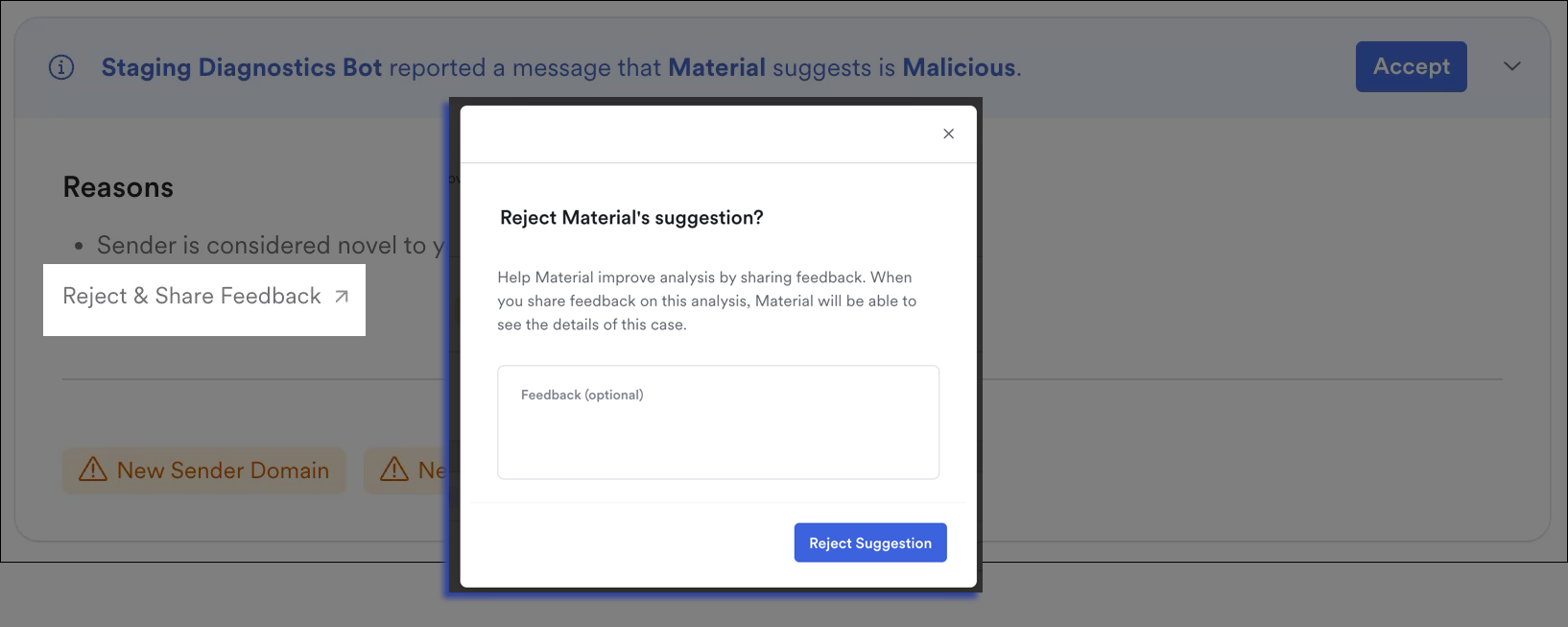
From the issue details, you can also reject the classification if you don't feel it's correct. Choosing this option classifies the issue as **None** (then you can update that to a new classification when you're ready).
:sparkles: Optionally, let us know why you're rejecting the classification category so we can continue to improve auto-triage. Note, we will be able to see your issue details only if you share feedback in the feedback field, not if you only reject the suggestion.
### Response and Remediation
Once the issue is classified, any auto-remediation you set for that classification ([see step 4 below](#enable-auto-classification)) immediately takes place. As with every Material detection and automated remediation, you can always change the remediation of each issue as needed.
{% hint style="success" %}
If you re-classify the issue after it's been auto-classified (and subsequently auto-remediated), the remediation for the new classification will then trigger and replace any existing remediation on the issue.
{% endhint %}
#### Report Acknowledgments
If you also enable auto triage:
* If [Reporter Acknowledgements](/email-protections/email-threats/settings.md#user-reporting-reporter-acknowledgements) are configured, your users will see slightly different copy on their acknowledgment indicating Material Security reviewed the message (when auto classification is responsible for the issue classification).
* If the issue is auto classified, [response for unreviewed messages](/email-protections/email-threats/settings.md#response-for-unreviewed-messages-with-default-remediation) is skipped
If Material already created an issue for the same message before one of your users reported it, a single issue is created with the user report added. Your users still receive any configured reporter acknowledgments. [Learn more about issue grouping](/email-protections/user-reports/user-reporting-methods.md#issue-grouping-across-detection-sources).
{% hint style="info" %}
Want to learn more about how User Reporting auto triage is solving for sophisticated attacks that slip through automated filters? Check out two of our blog posts [here](https://material.security/resources/classifying-chaos-how-material-automates-user-reported-phishing-at-scale) and [here](https://material.security/resources/streamlining-email-security-automating-user-reports-end-to-end).
{% endhint %}
***
## Enable Auto Classification
Enable auto classification to automatically accept classification recommendations and apply any response or remediation you pre-configured immediately.
1. Log in to **Material**.
2. From the left navigation, expand **User Reports**, then click **Settings**.
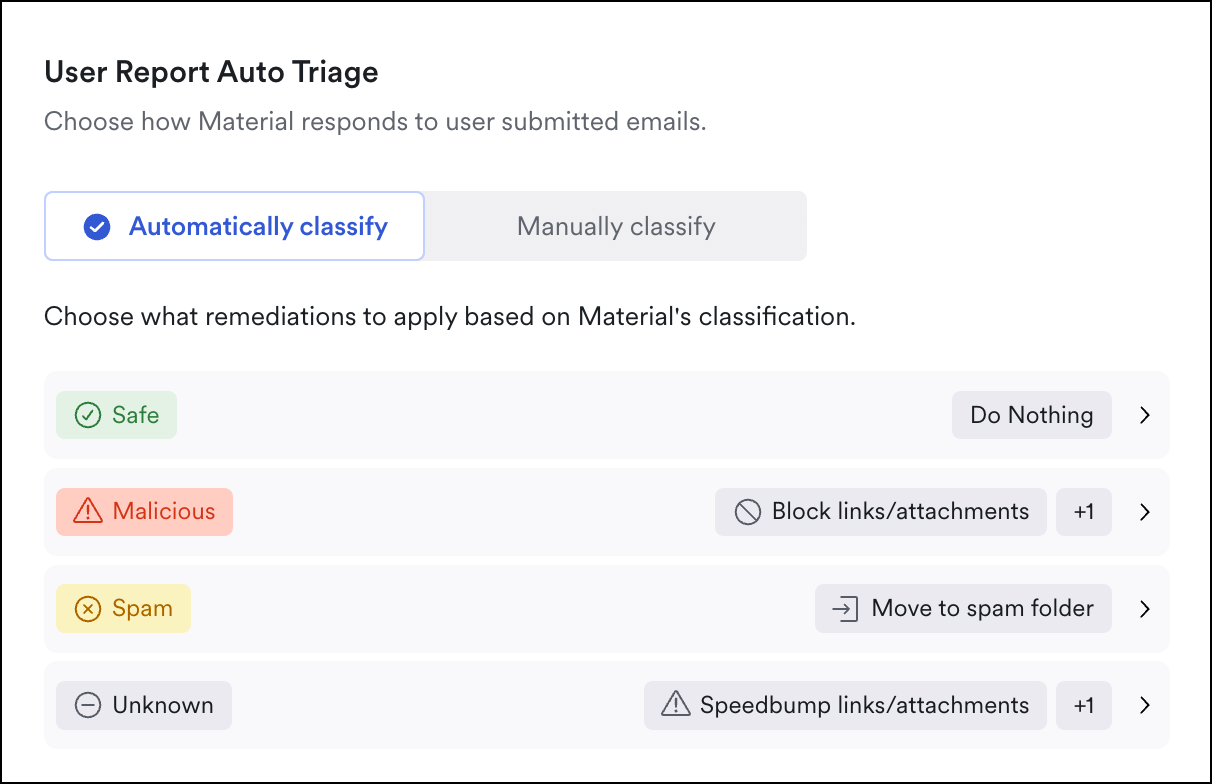
3. Scroll to **User Report Agent**, then select **Automatically classify**:
User Reports > Settings
4. For each classification type, choose from the auto-remediation options described [here](/email-protections/email-threats/settings.md).
Set auto-remediation
### Disable Auto Classification
To disable, follow steps 1-3 above, but choose **Manually classify**.
***
## FAQ
What if auto classification marks a malicious email as safe?
The auto classification's machine learning model is highly accurate, but sophisticated attacks — particularly those abusing trusted infrastructure like Microsoft or Google — can sometimes be misclassified as safe. If you believe a message was incorrectly classified, here's what to do.
**One: Reclassify the issue**
From the issue details, update the classification to **Malicious** or **Spam**. Any remediation configured for that classification will trigger automatically.
**Two: Notify users who already received a "safe" verdict**
When Material classifies an issue, users who reported it receive an acknowledgment. If you reclassify the issue, **those users are not automatically notified** of the updated verdict.
From the issue detail, scroll to the reporter response section and check **Also send to previous reporters** before sending your updated response. This ensures users who may have acted on the original "safe" verdict — for example, clicked a link — are informed of the updated classification.
**Three: Submit feedback to Material**
To help our Threat Research team investigate and improve detections for your instance:
1. From the issue, open the **All Actions** menu (`⌘K` or click **All Actions** in the top right).
2. Click **Share Feedback**.
3. Select **Material did not catch this**.
This sends the issue to our Threat Research team, who will investigate and may push updated detection rules to your instance to catch similar threats going forward.
{% hint style="info" %}
See [Share Feedback on Email Threats](/email-protections/email-threats/issues/share-feedback-on-email-threats.md) for more on sharing issues and feedback with Material.
{% endhint %}
[^1]: emails identified as harmful, containing threats such as malware, phishing attempts, or links to fraudulent websites
[^2]: unsolicited, often irrelevant emails sent in bulk, typically for advertising purposes, which can clutter inboxes but aren't necessarily harmful
[^3]: emails deemed free of threats, containing no malicious content or links, and posing no risk to the recipient's security
---
# Agent Instructions
This documentation is published with GitBook. GitBook is the documentation platform designed so that both humans and AI agents can read, navigate, and reason over technical content effectively. Learn more at gitbook.com.
## Querying This Documentation
If you need additional information that is not directly available in this page, you can query the documentation by asking a question.
Perform an HTTP GET request on the following URL with the `ask` and `goal` query parameters:
```
GET https://docs.material.security/email-protections/user-reports/user-report-auto-classification.md?ask=&goal=
```
`ask` is the immediate question: it should be specific, self-contained, and written in natural language.
`goal` is what the user is ultimately trying to achieve, the reason they need the answer. Sharing it helps GitBook give you a better, more relevant answer. A goal is most helpful when it describes the outcome the user wants rather than restating the question. For example, with `ask=how do I create an API token`, a goal like `automate deployments from our CI pipeline` lets GitBook tailor the answer to that use case.
The response will contain a direct answer to the question and relevant excerpts and sources from the documentation.
Use this mechanism when the answer is not explicitly present in the current page, you need clarification or additional context, or you want to retrieve related documentation sections.


.gif)